Do landlords need MTD software?
If your qualifying rental income is above the MTD threshold, yes — you will need compatible software to send quarterly updates to HMRC.
But that does not mean you need a full accounting system. Many landlords already have a rental spreadsheet that tracks rent and property expenses perfectly.
The only difference under MTD is that your rental records now need a digital connection to HMRC. This is where bridging software comes in.
Can landlords still use Excel for MTD?
Yes. Landlords can still use Excel for Making Tax Digital, provided their records are connected to HMRC through compatible software.
MTD does not mean replacing your rental spreadsheet. It means using software that creates the digital link between your records and HMRC.
If your spreadsheet already tracks rental income and property expenses, you are most of the way there. Bridging software handles the submission part.
What is bridging software for landlords?
Bridging software connects the spreadsheet you already use with HMRC's Making Tax Digital system.
Instead of moving your rental bookkeeping into a new accounting platform, bridging software lets you keep your existing rental records and submit the required updates digitally. You review everything before anything reaches HMRC.
Your Rental Spreadsheet
Keep recording rent and expenses as you do today
Otis
Creates the digital link HMRC requires
HMRC
Receives your quarterly updates
Two ways landlords can prepare for MTD
Option 1: Move to accounting software
Some landlords choose full accounting software because they want invoicing, bank feeds, and broader financial management. This works if you are ready to rebuild your bookkeeping from scratch.
Option 2: Keep your spreadsheet + bridging software
If your rental spreadsheet already tracks rent and property expenses, keep using it. Bridging software connects your existing records with HMRC for quarterly submissions — no need to start again.
Do landlords need accounting software for MTD?
Not necessarily.
Some landlords choose full accounting software because they want additional bookkeeping features. Others simply need a way to submit their existing rental records digitally.
If your spreadsheet already tracks rental income and property expenses, bridging software may be all you need.
Do I need MTD software if I only have one rental property?
Yes, if your qualifying rental income is above the MTD threshold.
MTD is not only for professional landlords with large property portfolios. A landlord with one buy-to-let property may still need compatible software.
The good news is that your record keeping does not need to become more complicated. If you track everything in a simple spreadsheet, bridging software handles the rest.
MTD Thresholds for Landlords
Based on your gross rental income before expenses — not your profit. See note below.
Thresholds apply across all rental properties combined — not per property. Includes UK and overseas rental income.
The Threshold Is Your Rent, Not Your Profit
This catches a lot of landlords out. MTD applies based on what you receive in rent — before you deduct any expenses. Agent fees, maintenance, mortgage interest — none of that reduces the number HMRC uses.
Your two properties generate £55,000 in rent. After expenses — mortgage, agent fees, repairs — your actual profit is £18,000. You are still in scope for MTD from April 2026, because the threshold is based on the £55,000, not the £18,000.
What changes for landlords under MTD?
What stays the same
- Your rental spreadsheet
- Your expense categories
- How you track rent and property expenses
- Your existing bookkeeping habits
What changes
- Quarterly submissions to HMRC
- Digital connection required
- Using compatible MTD software
How Quarterly Updates Work
Every 3 months, you tell HMRC:
- How much rental income you received
- What your property expenses were
- Any changes to your property setup
These are not final — you can adjust everything at year end. Deadlines: 7 August, 7 November, 7 February, and 7 May each year.
HMRC will not issue penalty points for late quarterly submissions during the first year. Late annual returns can still attract penalties, but the first year is your adjustment period.
From 2027, a points-based system applies — one point per missed quarter. Four points triggers a £200 fine.
What MTD Doesn't Cover
Quarterly updates only cover your rental income and property expenses. PAYE income, pension income, dividends, and bank interest are not part of your quarterly submissions — those are still declared at year end.
If you are employed as well as being a landlord, MTD handles the rental side. Your employer continues to handle PAYE separately. Properties owned through a limited company are also excluded.
What If You Own Property Jointly?
Each owner is assessed individually, based on their share of the rental income. If you and a partner jointly own a property generating £80,000 in rent, your share is £40,000 — and whether that triggers MTD depends on what else you earn from property or self-employment.
If you both exceed the threshold, you each need to register and submit separately — but you can both use the same software.
Already in Self Assessment? That does not register you for MTD. You need to sign up separately with HMRC and connect your chosen software before 6 April 2026.
How Otis Fits In
Otis is MTD software built specifically for landlords who track things in a spreadsheet. It is not a full accounting platform. It does not try to take over your finances.
You keep your rental spreadsheet. You track rent however you like. Otis creates the digital link HMRC requires — reads your rental records, organises them into HMRC-ready categories, and submits them in a few clicks.
You review everything before anything goes to HMRC. You can also download our free spreadsheet template or read our full guide to how Otis works.
Common landlord MTD scenarios
I have one buy-to-let property
You may still need MTD software depending on your rental income. The threshold applies to total rental income, not the number of properties.
I only use Excel for my rental income
Keep using it. Otis creates the digital link HMRC requires without changing how you track rent and property expenses.
I jointly own a property with my spouse
Each owner is considered separately for MTD. Your share of the rental income determines whether you need to register.
I have rental income and self-employed income
Your rental and self-employed income may both be relevant, depending on your circumstances. Combined income determines your MTD obligations.
I use Google Sheets instead of Excel
No problem. Otis works with any spreadsheet format you use to track your rental records.
I do not have an accountant
Otis is designed for landlords who manage their own rental records. You stay in control — and you review everything before submission.
Finding Otis Through the HMRC Tool
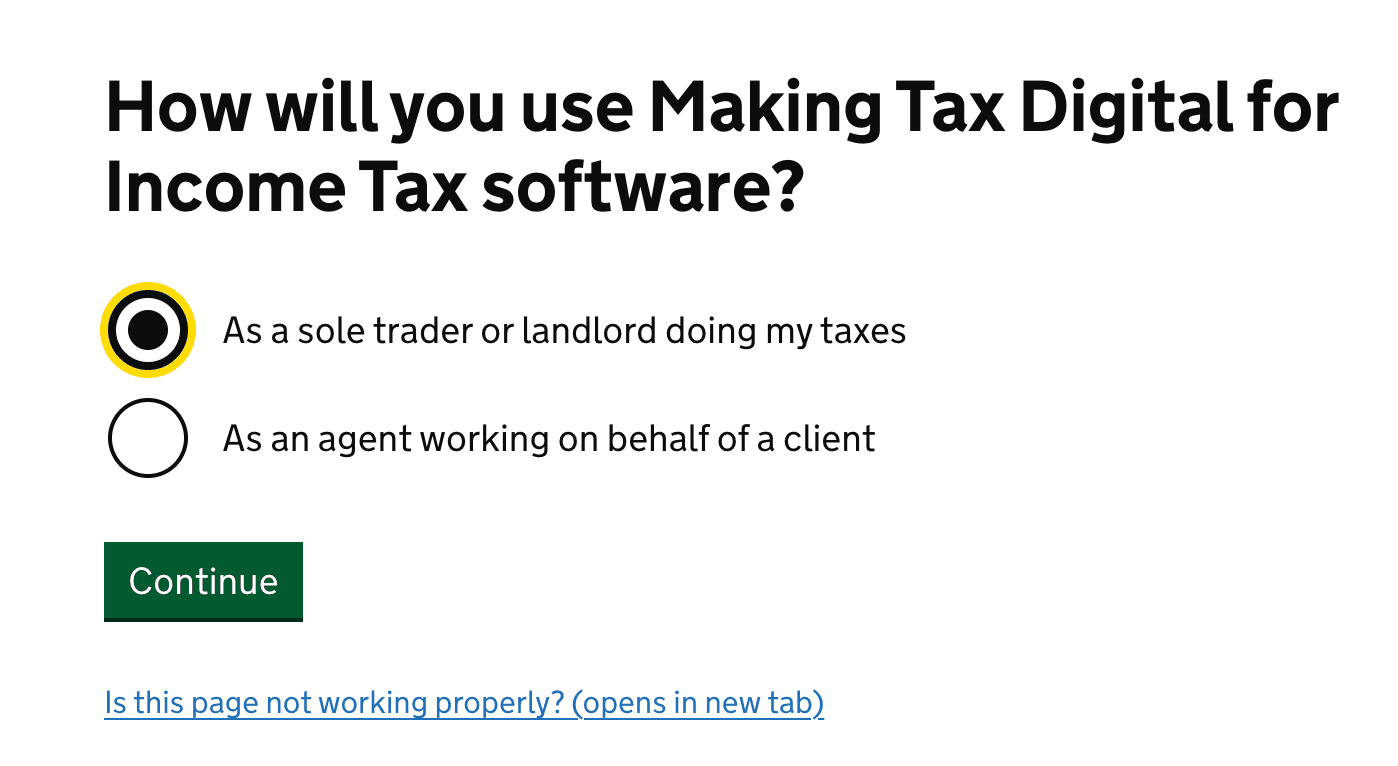
HMRC maintains a software finder tool for landlords and sole traders. Here is how to navigate it — and find Otis at the end.
This tells HMRC you want software for individual quarterly updates — not a business or company.
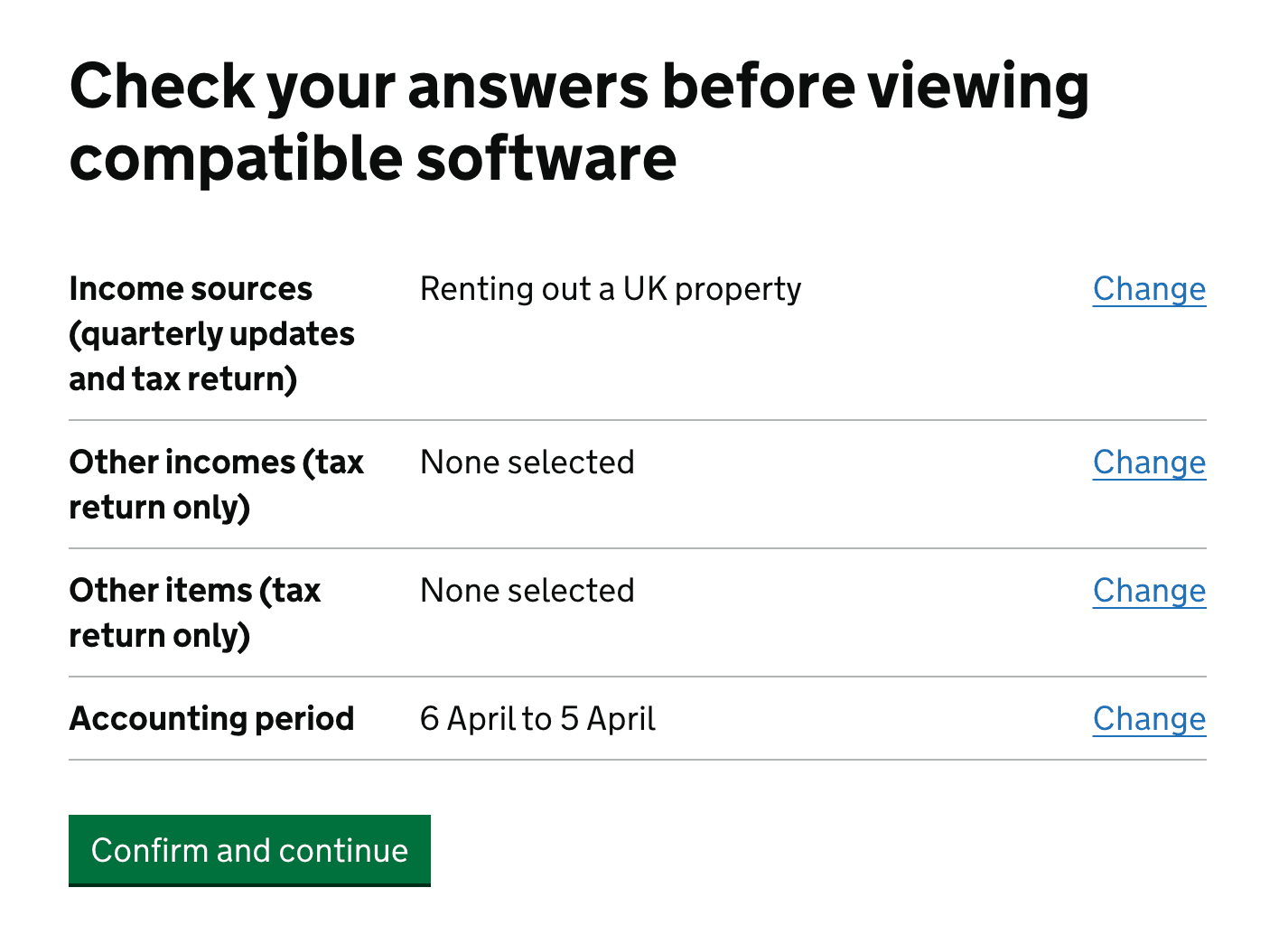
This filters results to property-specific MTD software. Otis supports both UK and overseas rental income.

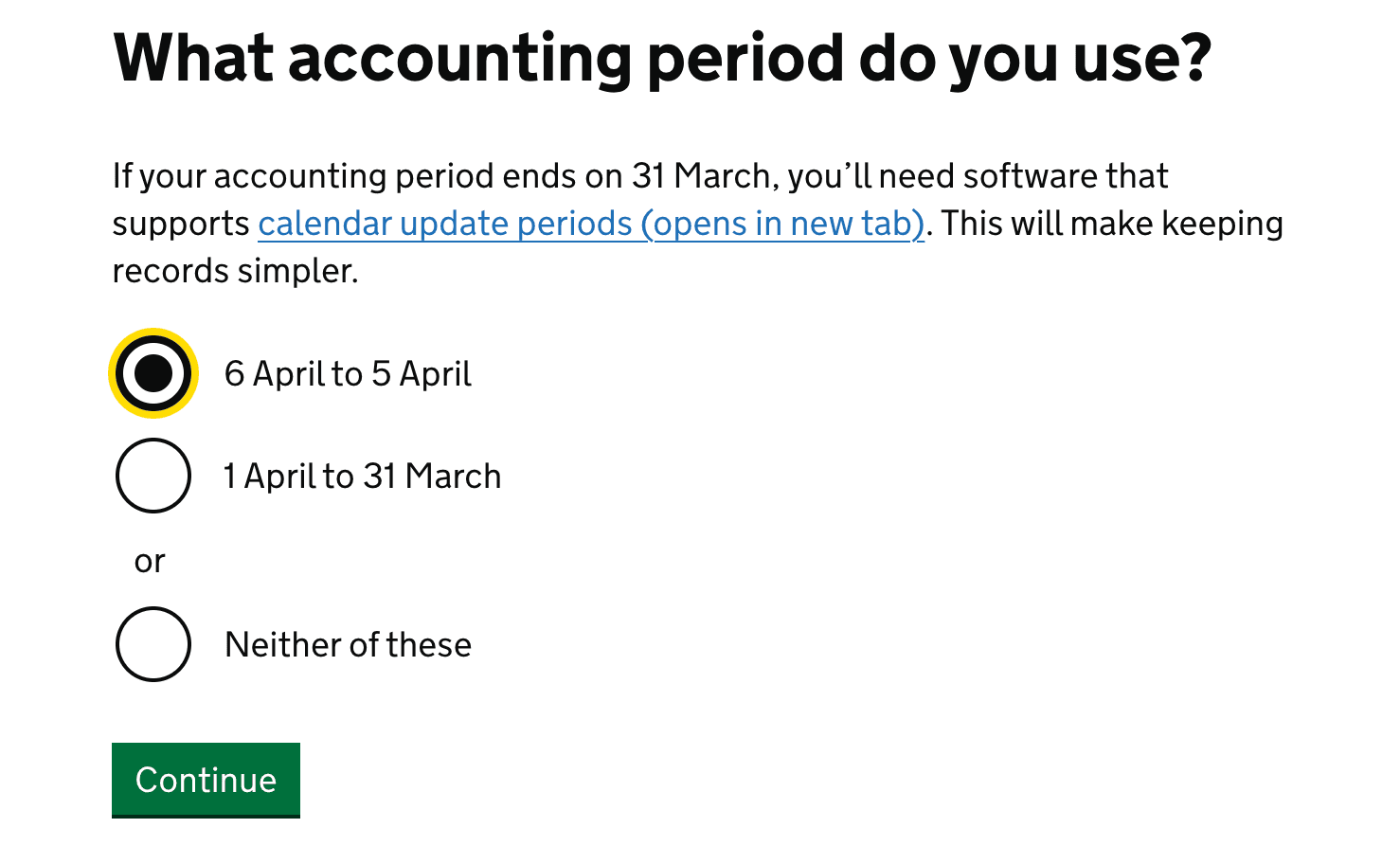
Select the accounting period your rental income runs to. Otis works with either option.
Answer the remaining questions to narrow results to simple, submission-focused tools built for landlords.
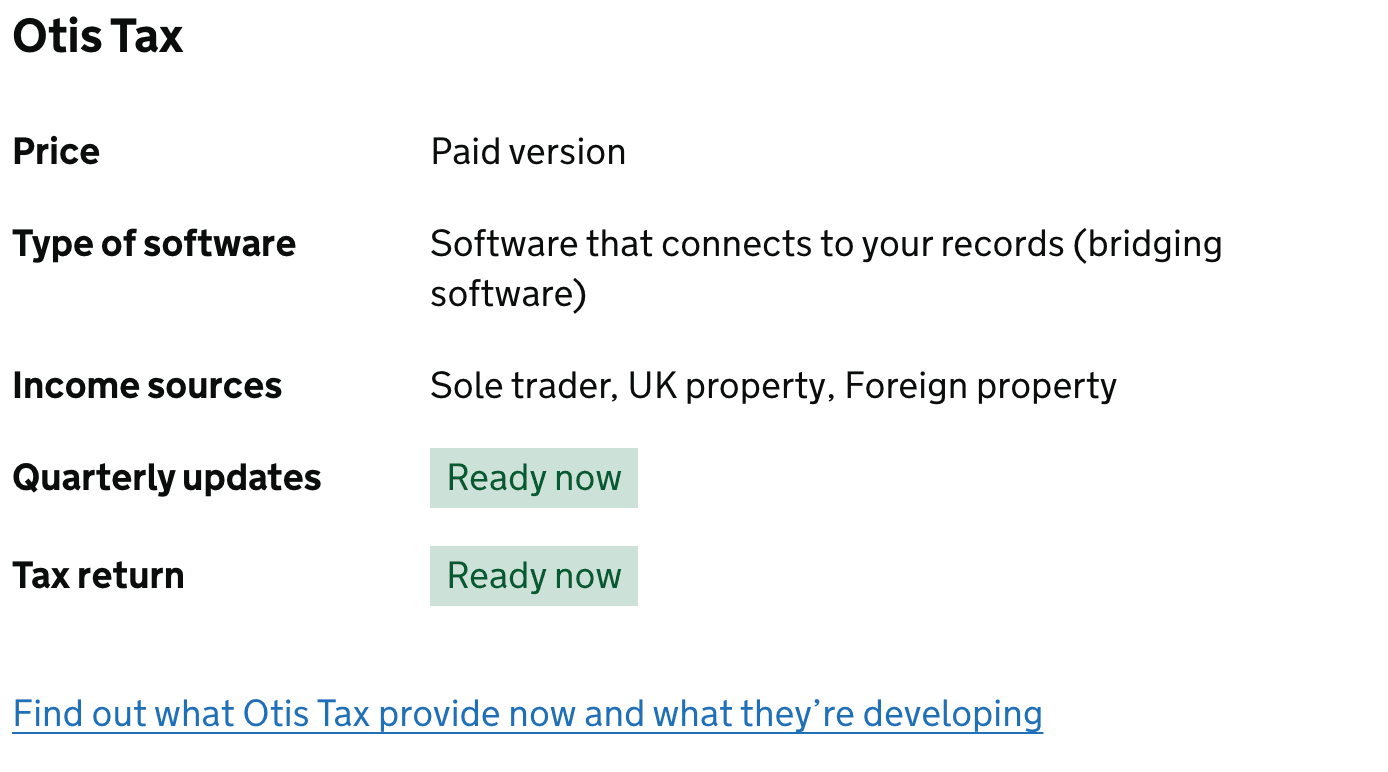
You'll see Otis listed as an approved bridging software solution — HMRC verified and ready to use.
Ready to Get Started?
Keep your rental spreadsheet. Meet HMRC requirements. Nothing changes except how you submit.